My New Coding Workflow with Neovim, LazyVim and Local AI
Published Sep 01, 2026
Recently, I decided to change the way I code.
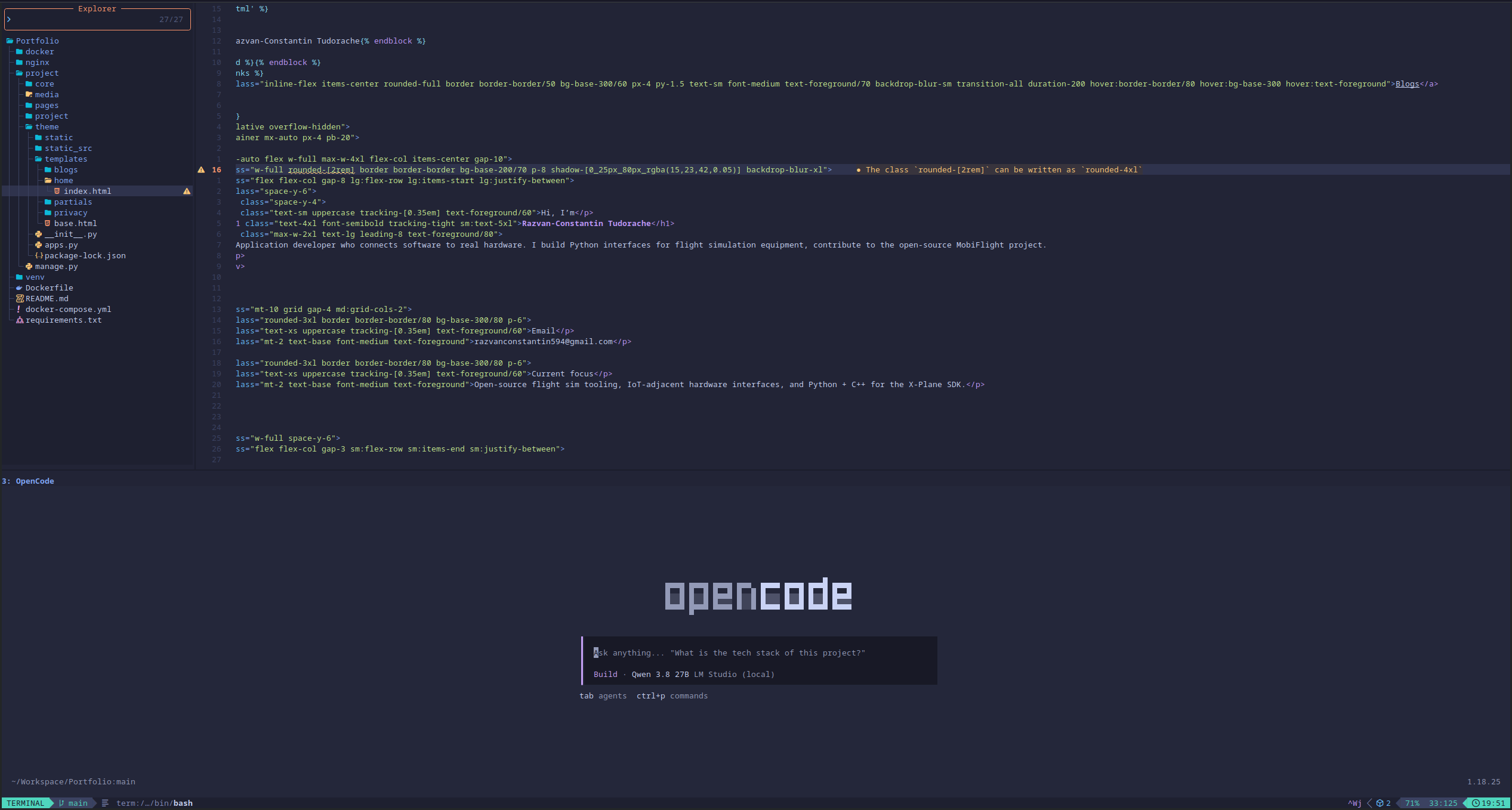
I started using Neovim with LazyVim, integrated OpenCode into my workflow, and I am running Qwen3.8 locally through LM Studio.
And honestly, I am having a blast.
Why I switched to Neovim
For a long time, I used traditional IDEs and editors for my development work. They are great tools, but I always felt like there was a lot happening around the actual code.
I wanted something faster, more keyboard-driven, and more customizable.
That is where Neovim came in.
I had tried Vim and Neovim before, but I never really got into it. The learning curve felt quite steep, especially when you are used to editors like Visual Studio or VS Code.
This time, however, I decided to properly learn it.
Instead of configuring everything from scratch, I started with LazyVim. This made the initial setup much easier while still giving me the flexibility to change almost everything later.
After spending some time learning the keybindings and getting comfortable with the workflow, things started to click.
Everything is on the keyboard
One of the biggest changes for me is how much less I use the mouse.
Moving between files, navigating code, opening terminals, splitting windows, searching through a project and switching between buffers can all be done from the keyboard.
At first, this felt slower than using a normal IDE.
Now it feels completely different.
Once you stop thinking about the individual key combinations and start thinking in terms of actions, navigating around a project becomes extremely fast.
I can have my code, multiple terminals and other tools open without constantly switching between applications.
It also makes me feel much more focused.
Instead of constantly moving between my editor and terminal, everything is part of the same environment.
OpenCode + Local AI
The part that makes this setup especially interesting for me is OpenCode.
I have integrated OpenCode directly into my development workflow and I can interact with an AI coding assistant without leaving my terminal environment.
But instead of relying entirely on a cloud-based model, I am also experimenting with running AI locally.
For this, I am using Qwen3.8 locally through LM Studio.
Having a capable coding model running on my own hardware is something I find really interesting.
I can start working on a project, open a terminal, run OpenCode and have an AI assistant available directly alongside my development environment.
It feels much more integrated than simply opening a separate AI website and copying code back and forth.
My workflow now
My workflow is currently something along these lines:
- Open Neovim with LazyVim.
- Navigate through the project using the keyboard.
- Make changes directly in the editor.
- Open a terminal inside Neovim when I need to run commands.
- Use OpenCode when I need help understanding, changing or developing something.
- Run and test everything without leaving the environment.
- Use Git directly from the terminal.
This might not sound revolutionary, but the difference in practice is surprisingly large.
There is much less context switching.
I am spending more time actually working on the project and less time managing the tools around it.
The learning curve is worth it
I am definitely still learning Neovim.
There are a lot of keybindings, commands and concepts that I do not know yet. Sometimes I still have to look up something that would be completely automatic for me in another editor.
But that is part of the fun.
Every time I learn a new command, I feel like I am making the editor a little more natural to use.
I also like that LazyVim gives me a good starting point without taking away control. I can use the defaults while I am learning and gradually customize things as I understand what I actually want.
Why I am enjoying it so much
The biggest thing I noticed is that coding feels more enjoyable.
There is something satisfying about having a terminal, editor, Git, AI tools and the rest of my development environment working together.
It feels lightweight and extremely flexible.
I also enjoy the fact that I am actually learning how my development environment works instead of just installing an IDE and accepting whatever workflow it provides.
Neovim has definitely made me more interested in improving my tooling.
Still experimenting
I am nowhere near finished with this setup.
I still want to improve my Neovim configuration, learn more about LazyVim, make OpenCode fit better into my workflow and experiment more with local AI models.
I am especially interested in seeing how far I can push a completely local development environment.
For now, though, I am very happy with the change.
Neovim + LazyVim + OpenCode + local Qwen3.8 has completely changed how I approach coding.
I started this experiment because I wanted a different editor.
I ended up changing my entire development workflow.
And I am having a lot of fun doing it.